|
原文链接: https://www.tomshardware.com/reviews/cr,318.html Crème De La Crème: Special Edition 815 Boards and Useful Add-OnsFeaturesBy Patrick Schmid published May 8, 2001Edition-Mania: AOpen, Asus And Azza With Interesting Add-Ons
 [color=rgba(0, 0, 0, 0.85)]主板市场的竞争正变得越来越激烈,导致利润不断下滑,迫使主板厂商不得不将业务拓展到其他领域。所有大型主板制造商早已设立了 CD/DVD 驱动器、多媒体产品、机箱或网络产品相关部门。然而,主板生产仍是它们的核心业务,没有哪家公司愿意失去这一领域的市场份额。The air is getting thinner and thinner in the motherboard market. High competition causes decreasing margins and forces the motherboard companies to expand their business to other sectors. All big motherboard makers have already established divisions for CD/DVD drives, multimedia products, cases or network products long ago. However, the production of motherboards still remains the core business and no company wants to lose market share.[color=rgba(0, 0, 0, 0.85)]打造一个品牌是最困难的工作。品牌一旦建立,就必须专注于提供可靠、高性能且价格亲民的产品。若能在此方面取得成功,下一步便是提升产品的吸引力。其中一种策略是为产品加入特殊的硬件功能,例如 SCSI 控制器、RAID 控制器或FireWire控制器。但问题在于,这些组件会直接推高主板的成本,导致其对许多用户的吸引力下降。The most difficult work is to introduce a brand. As soon as that is done, you have to concentrate on providing products that are reliable, fast and affordable. If you succeeded with that, the next step is making your products more attractive. One approach is to include extraordinary hardware features like a SCSI, RAID or FireWire controller. The problem is that those components will automatically increase the price of the motherboard, making it less attractive to many users.[color=rgba(0, 0, 0, 0.85)]第二种策略是筛选出理想的硬件配置,以此打造出一款既可靠、性能又出色,同时大多数用户都能负担得起的产品。此外,厂商还会开发实用的附加配件。本文将重点介绍一种安装在 5.25 英寸驱动器仓位中的特殊硬件。Azza用此类模块,将 USB 接口和音频接口前置到电脑机箱正面;AOpen则在一个光盘盒式装置上添加了 LED 指示灯,可提示多种系统故障类型;而在正式评测开始前,华硕(Asus)的方案似乎最为巧妙 —— 华硕 iPanel(智能面板)将各类接口与系统监控功能整合在了一起。The second way is to find the ideal hardware equipment in order to provide a reliable and fast product that is still affordable for the majority. In addition, the manufacturer develops useful add-ons. This article concentrates on special hardware that has to be installed into a 5.25" drive bay. Azza uses such a module to make USB and audio jacks available at the front of your computer case. AOpen took a CD box and added LEDs which will inform you about several types of system failure and Asus seems to have the most clever solution before the actual review starts: The Asus iPanel merges connectors and monitoring features.[芯片组介绍略]
Gimmicks And Special Editions[color=rgba(0, 0, 0, 0.85)]AOpen是首家推出特殊颜色PCB的制造商。一年前,该公司发布了 AX6BC Pro II 千禧版主板,其 PCB 采用黑色设计。而最新的创意则是一款粉色 PCB 的主板:AOpen was the first manufacturer that introduced a special PCB color. One year ago, it released the AX6BC Pro II Millennium Edition , which was colored black. The latest idea is a board that is pink:
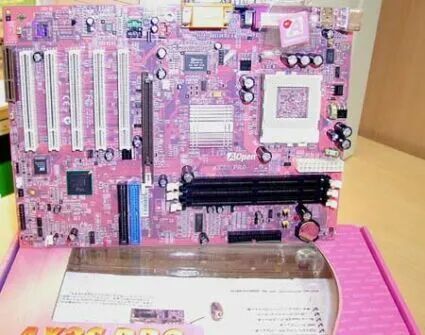 在欧洲或美国,人们对粉色主板并不算特别感兴趣,英国布莱顿或美国旧金山或许是少数例外。这张照片是我几周前在2001年德国汉诺威消费电子、信息及通信博览会(CeBIT2001)的AOpen展台拍摄的。显然日本人对这类特色硬件情有独钟,因为日本是建碁唯一销售该款粉色主板的市场。或许未来我们还能看到更多颜色的主板?
In Europe or the United States people aren't exactly awfully keen on pink motherboards, with the possible exception of Brighton/UK or San Francisco. I took this photo at CeBIT2001 a few weeks ago at the AOpen booth. The Japanese are obviously crazy for extraordinary hardware, as it is the only market where AOpen is selling those boards. Maybe we are going to see more colors?
华硕和Azza注意到一个问题:USB接口等各类接口通常只在电脑主机背面可见。为此,它们设计了专用装置——将这些接口集成到可安装在5.25英寸驱动器仓位的模块中,实现接口前置。
Asus and Azza realized the problem that interfaces such as the USB-connector are usually only visible at the rear of your PC. They designed boxes to make connectors available at the front by installing them into a 5.25" drive bay.
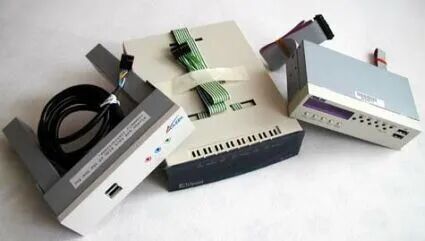
AOpen的“Dr. LED”功能通过多颗LED指示灯实时反馈系统状态,这些指示灯被集成在一个可安装于任何5.25英寸驱动器仓位的外壳中。不过建碁还在这个模块里整合了一个小型光盘盒,因此该驱动器仓位并未完全用于放置LED指示灯。
AOpen's 'Dr. LED' feature keeps you informed about the system status with several LEDs. Those LEDs are integrated into a case that can be installed into any 5.25" drive bay. AOpen decided to integrate a little CD box into it, thus the drive bay is not entirely used for the LEDs.
Azza的“Azza-Up”是一款简易前置面板,提供两个USB接口和音频接口。为节省空间,用户可在安装“Azza-Up”的仓位中同时安装一块硬盘——该模块配备了用于安装硬盘的3.5英寸支架。
Azza''s 'Azza-Up' is a simple front panel which gives you two USB ports and audio jacks. To save space you can install a hard drive into the bay used by the Azza-Up, as it comes with a 3.5" frame for drive installation.
华硕iPanel分为标准版和豪华版,堪称Azza与AOpen核心功能的完美融合。标准版配备两个USB接口、多个按键、状态指示灯,以及一个用于显示可能出现的错误代码的四位数字显示屏;用户还可选购红外模块,以扩展与红外设备(如手机或笔记本电脑)的连接功能。豪华版则额外增加了一个串口和音频接口。后续会详细介绍其功能细节。
The Asus iPanel is available as a basic and a deluxe edition and seems to be the perfect fusion of the Azza and AOpen core features. The basic type features two USB ports, a few buttons and status LEDs as well as a four-digit display that is meant to report possible error codes. An IrDA module is optional to expand connectivity with IR devices (e.g. mobile phones or notebooks). The deluxe edition comes with a serial port and audio jacks as well. I will go into detail later.
主板厂商研发这类硬件的主要原因显然是主板市场的激烈竞争。采用相同芯片组的主板,其性能通常相差不大;在功能方面,差异化空间也十分有限。而这类前置面板等特色功能,似乎成了主板厂商与竞争对手形成差异化的唯一途径。
The main reasons for inventing such kind of hardware is of course the high level of competition in the motherboard market. The performance of motherboards using the same type chipset usually does not vary too much. In terms of features, there also is not much space for variation. Special features like those panels seem to be the only way for motherboard makers to differ from their competitors.
Asus CUSL2-C Black Pearl Plus IPanel
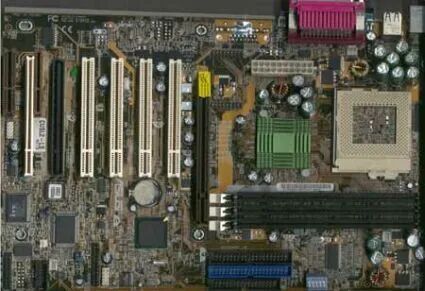
Board Revision: 1.04 BIOS Version: 1006A (February 27, 2001) 得益于黑色的外观设计,这款主板看起来相当酷炫。它配备了 6 个 PCI 插槽、4 个 USB 接口、3 个 DIMM 插槽以及 AGP 4x 插槽。
Thanks to the black color, the motherboard looks pretty cool. It comes with a total of six PCI slots, four USB ports, three DIMM sockets and AGP 4x.
[color=rgba(0, 0, 0, 0.85)]大多数人应该都对华硕的软超频设置有所了解 —— 该功能支持将FSB频率设置在 66 至 166 兆MHz之间,Vcore可在 1.3 至 2.0 V之间进行多档位调节,同时还能调整倍频。不过需要说明的是,大多数英特尔处理器的倍频是固定的,只能通过调整前端总线频率来实现超频。
Most of you already know the Asus soft setup, which allows setting FSB speeds between 66 and 166 MHz, several Vcore settings between 1.3 and 2.0 V and also the multiplier - even though most Intel CPUs come with a fixed multiplier and can only be overclocked by altering the FSB speed.[color=rgba(0, 0, 0, 0.85)]多年来,华硕主板在稳定性和性能方面一直处于行业顶尖水平。这款 CUSL2-C “黑珍珠”主板完美延续了这一特质 —— 它不仅是一款技术精湛的产品,外观设计也颇具吸引力。In terms of stability and performance, Asus is at the very top for many years now. The CUSL2-C Black Pearl fits perfectly into this image, as it is not only a technical delicacy, but even kinda appealing to the eye.
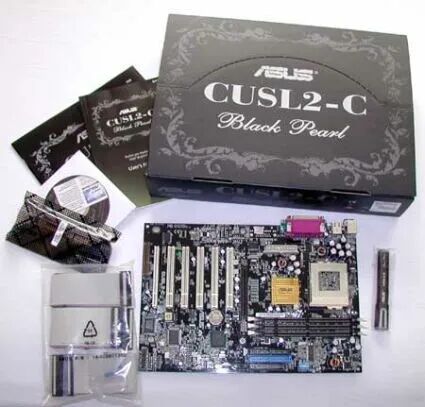 “黑珍珠”特别版主板采用专属黑色包装盒。打开包装盒,内部包含一套螺丝刀、一张驱动光盘、几根扁平数据线、一个用于扩展 3 号和 4 号 USB 接口的 USB 接口连接器,以及两本说明书。其中一本是包含五种语言的快速安装指南,这是我至今见过的最优质的安装指南;另一本则是华硕常规的产品说明书 —— 其质量也一如既往地出色。
The Black Pearl Edition comes in a special black box. Inside it, we found a set of screwdrivers, a driver disc, several flat cables, a USB port connector for the USB ports 3 and 4 and two manuals. One quick setup guide in five languages, which is by far the best installation guide I've ever seen, and additionally the common Asus manual - this one is also as good as ever.
Asus IPanel
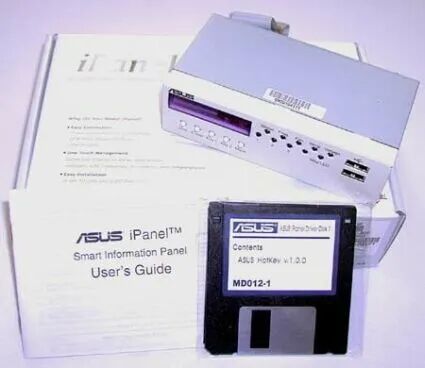 华硕 iPanel是一款独立硬件产品,不与任何主板捆绑销售,需单独购买。产品包含 iPanel 模块(设计用于安装在闲置的 5.25 英寸驱动器仓位中)、一本简易说明书,以及一张装有华硕热键软件的光盘。
The iPanel is a piece of hardware which is not bundled with any motherboard but has to be obtained separately. You can see the iPanel module (designed to be installed into a free 5.25" drive bay), a little manual and a disk with the Asus software (Asus Hotkey).
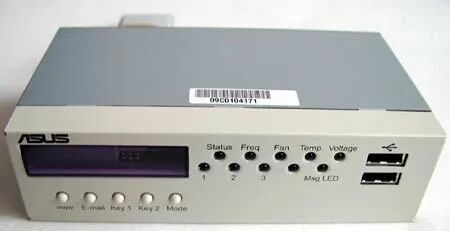 正如此前所提及的,华硕iPanel有两个版本可供选择:此次评测拿到的标准版,以及一款豪华版。豪华版包含标准版的所有功能,在此基础上额外增加了音频接口和一个串口。此外,两个版本均可选配红外端口。
As I already mentioned, there are two versions available: The basic version that we got for review as well as a deluxe edition. The deluxe edition has everything the basic version has plus audio jacks and a serial port. Both types are optional available with an IR port as well.
四位数字显示屏能实时显示当前系统状态,并可播报错误代码,这让排查系统故障原因的过程变得简单得多。显示屏正下方设有多个按键,分别是“www”键、“email”键、“1号”自定义键、“2号”自定义键以及“mode”键。其中,“mode”键显然是功能切换键,按下后可查看系统频率、风扇转速等技术参数;“www”键和“email”键则会分别自动启动电脑默认的浏览器和邮件客户端;“1号”和“2号”键可使用华硕热键软件自定义功能。
译者注:www和email键应该是映射到什么组合键?
The four-digit display keeps you up to date about the current system status and can report error codes. That makes it much easier to determine the reason for system failure. There are several keys right below this display: www, email, key 1, key 2 and mode. 'Mode' is of course a function key that will show you technical data like system frequency or fan rotation speed. 'www' and 'email' will automatically launch your default browser respectively default email client. The keys 1 and 2 can be assigned to any desired function. For that purpose you have to use the Asus Hotkey software.
LED无需过多解释:标注为“1-3”的指示灯可自由分配功能,其余指示灯的用途均有明确标识。
I guess there is not much to explain about the LEDs. Those labeled 1-3 can be freely assigned, while all others are clearly described.
这两个USB接口使得大多数华硕主板附带的USB转接面板失去了用武之地——通常情况下,用户需要借助那款转接面板来使用主板的3号和4号USB接口。
The two USB ports make the USB adapter panel obsolete, which is included with most Asus motherboards. Usually you will need it for the USB ports 3 and 4.
AOpen Dr. LED
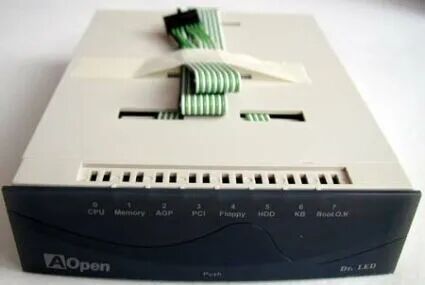 这就是AOpen这款 LED 产品的外观。与华硕和Azza的同类产品不同,“Dr. LED” 没有任何连接功能,它纯粹是一款用于系统监控的设备。从图片中可以看到,该设备配备了多颗指示灯,分别对应 CPU、内存、AGP 接口、PCI 接口、软盘驱动器、硬盘驱动器、键盘,此外还有一颗启动状态指示灯。
That's what AOpen's LED product looks like. Dr. LED has no connectivity features like the products from Asus and Azza. It is an instrument for system monitoring. As you can see in the picture, there are LEDs for CPU, memory, AGP, PCI, floppy, the HDD, keyboard and a boot status LED.
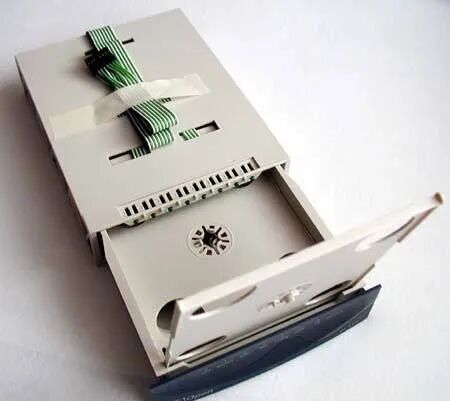 [color=rgba(0, 0, 0, 0.85)]若这么大的仓位只用来装几颗指示灯,未免太浪费空间。因此AOpen在 “Dr. LED” 模块中整合了一个可容纳 10 张光盘的光盘盒(见图)。只需拉出抽屉,就能取用。
Such a big case just for some LEDs would have been waste of space. AOpen included a CD box for 10 discs into the Dr. LED module (see photo). Just pull out the drawer to access the CD case.
Azza 815EXP Plus Azza-Up Panel
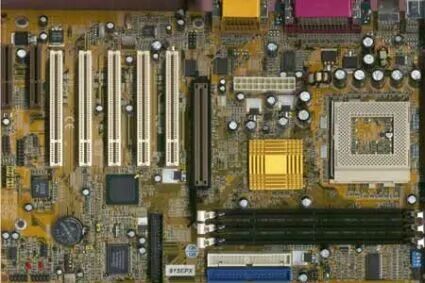 Board Revision: 1.0BIOS Version: January 20, 2001[color=rgba(0, 0, 0, 0.85)]Azza 815EXP 主板采用 815EP 芯片组,该芯片组不含集成显卡。主板配备 5 个 PCI 插槽、3 个 DIMM 插槽、1 个 AGP 4x 插槽、1 个 UltraATA/100 控制器、4 个 USB 接口,以及一套 AC97 音效系统。令人意外的是,这款主板上设有两个 CNR (通信和网络扩展插槽)—— 尤其考虑到大多数用户连一个 CNR 插槽都不会使用,这样的配置显得格外特别。Azza's 815EXP uses the 815EP chipset without integrated graphics. It features five PCI slots, three DIMM sockets, an AGP 4x slot, UltraATA/100 controller, four USB ports and an AC97 sound system. I was surprised to see two CNR slots on this board. Particularly because most users don't even equip one of them!这款主板运行速度快且稳定性强。尽管其 BIOS功能不如华硕或AOpen主板的那般详尽,但所有用于根据用户需求配置硬件的关键设置选项均已具备。
This board runs fast and reliable. Though the BIOS isn't as detailed as the Asus or AOpen ones, you will get all important switches to configure the hardware according to your needs.
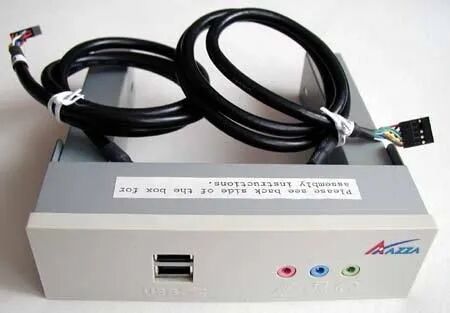 这款名为“Azza-Up”的前置面板与Azza 815EXP主板捆绑销售,同时附带的还有Star Office 5.2办公软件、Mandrake Linux操作系统、一张包含Azza-Up监控软件的光盘、虚拟光驱软件、一张驱动程序光盘、两根扁平数据线以及一本说明书。这整套配件被称为“Jumbo Pack”(超大套装)。
The panel called 'Azza-Up' is included with this motherboard as well as Star Office 5.2, Linux Mandrake, a disk including the Azza-Up monitor software, Virtual Drive, a driver CD, two flat cables and a manual. The whole stuff is called Jumbo Pack.
建碁(AOpen)的“Dr. LED”本质上是一款系统监控硬件,而这款“Azza-Up”面板则属于硬件扩展配件,其作用是将音频接口和两个USB接口前置到电脑机箱正面,方便用户使用。
AOpen's Dr. LED can be called monitoring hardware, while this panel is a hardware extension, making the audio jacks and two USB ports available at the front of your computer.
Conclusion
815芯片组推出至今已近一年,因此从这个角度来说,任何系统稳定性问题都难以让人接受。幸运的是,Azza 815EXP和华硕CUSL2-C“黑珍珠”(Black Pearl)两款主板的运行都极为稳定,且性能出色。不过Azza这款主板仍有提升空间,整体表现略逊于华硕的竞品。两款主板均搭载了标准硬件配置:Azza主板自带音效系统,而华硕主板没有这一配置;与之相对,华硕主板配备了第六个PCI插槽,该插槽自然也可用于安装独立声卡。
The 815 chipset is available for nearly one year now, that's why I would not forgive any problems with system stability. Fortunately, both the Azza 815EXP and the Asus CUSL2-C Black Pearl ran perfectly stable as well as fast. There is still some room for improvement with the Azza board, as it is a bit behind the competitor from Asus. Both motherboards are equipped with standard hardware. Azza features a sound system, which is not available on the Asus board. Asus, in contrast, has a sixth PCI slot that can of course be used for a sound card.
各家的驱动器仓位模块(指前置功能模块)给人的印象好坏参半。AOpen“Dr. LED”的设计思路本质上不错,但我不确定自己是否愿意为了这些指示灯和一个可容纳10张光盘的专用存储空间,而占用一个驱动器仓位。如今的CPU、显卡和硬盘发热量都很大,我更倾向于让机箱内部保持尽可能空旷的状态——因为每一个组件都会发热,进而导致系统整体温度升高。
The drive bay modules left a mixed impression. AOpen's Dr. LED is basically a good idea, but I doubt that I would abandon a drive bay in order to have those LEDs and a special storage space for 10 CDs. In times of hot CPUs, graphics cards and hard drives I prefer to keep my system as empty as possible, since every component will heat up and contribute to high system temperatures.
Azza则将“Azza-Up”的功能精简至真正必要的范畴。在我看来,前置面板的核心需求就是音频输入/输出接口、一两个USB接口,或许再加上一个红外接口。而“Azza-Up”恰好将三个音频接口和两个USB接口都前置到了机箱正面,例如可用于连接数码相机等设备,十分实用。
Azza reduced their Azza-Up only to functions that are really important. In my opinion that means a line in and line out plus one or two USB ports and maybe an IR port. The Azza-Up brings all three audio jacks and two USB ports to the front of the PC, which could e.g. be used for a digital camera.
华硕的iPanel无疑是最合理且最实用的解决方案。根据所购版本(标准版或豪华版)的不同,iPanel可提供各类接口,同时也有支持红外端口的版本可选。尽管iPanel是三款配件中价格最高的,但它无疑也是性价比最高的。
The most sensible as well as practical solution comes from Asus. The iPanel provides all kind of interfaces - depending on the version you buy (basic or deluxe). There are also versions with IR port available. Though the iPanel is the most expansive add-on, it is by far the most valuable.
|


 |Archiver|手机版|小黑屋|shangbanzu.xyz


 发表于 2025-10-9 10:23:57